Effortless Command Execution
Tired of manually typing long command strings during gameplay? QuickCmd provides an intuitive graphical user interface to assign, save, and execute your most frequently used Minecraft commands with simple keypresses.
Download Jar File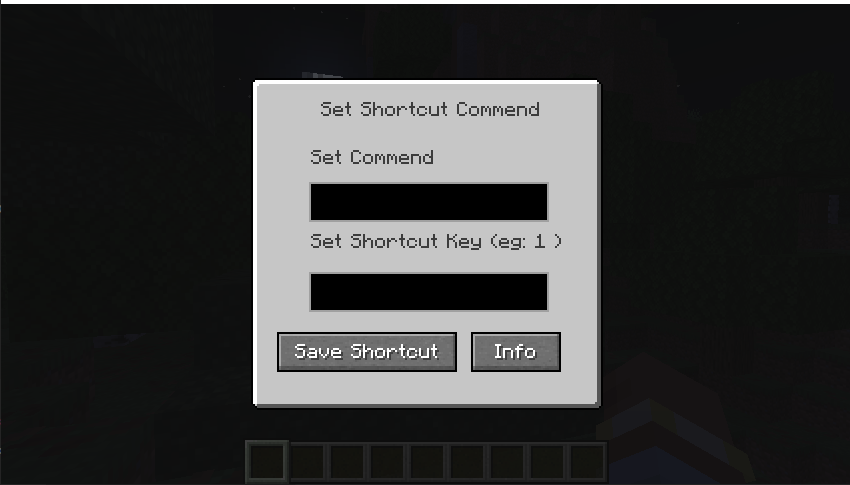
About QuickCmd
QuickCmd is a lightweight utility mod designed specifically for Minecraft 1.21.1 running on the NeoForge mod loader. Built to improve quality-of-life for server administrators, creators, and everyday players, QuickCmd eliminates the friction of repeating complex commands.
With a single configurable keybinding, you can instantly bring up the shortcut interface, modify your preferences, and trigger pre-saved commands without breaking your gameplay flow.
Key Features
Instant GUI Access
Press the default hotkey 'O' at any time in-game to bring up the QuickCmd interface instantly.
Custom Command Binding
Easily bind any valid command or shortcut key directly through the clear and user-friendly menu interface.
Built-in Information Menu
Access mod documentation, credits, and licensing policy directly from the integrated Info screen.
Lightweight & Optimized
Designed with zero impact on game performance, ensuring smooth frame rates while running in the background.
Installation Guide
Follow these quick steps to install QuickCmd on your Minecraft client:
- Ensure you have Minecraft 1.21.1 installed along with the NeoForge 26.1.2 mod loader.
- Download the
.jarfile using the download button above. - Open your Minecraft directory (press
Win + R, type%appdata%\.minecraft, and press Enter). - Locate or create the
modsfolder inside your Minecraft directory. - Move the downloaded QuickCmd
.jarfile into themodsfolder. - Launch Minecraft using the NeoForge profile and enjoy!
Licensing & Credits
QuickCmd is open-source software released under the terms of the MIT License. You are free to use, modify, and distribute this mod in personal or public modpacks.
Developed by tanoleo-hash (Thwin Thit) using MCreator.